What if preparing a USB stick did not mean opening an entire DJ performance suite? rbxport takes that idea seriously: keep the library, playlists, cues and export tools; leave out the modes you never use. It is an interesting option for DJs who play on standalone club equipment—but not a drop-in replacement for everything rekordbox does.
Research, not a hardware review. Checked on November 10, 2026 against version 1.10.0, the official website and the linked source snapshot. We have not installed rbxport or tested it on physical players. Developer benchmarks and compatibility claims are identified as such below. [9]
First: it is not a modified rekordbox
“Debloated rekordbox” is a useful shorthand for the idea, but technically inaccurate. rbxport is its own desktop application, built with Rust, Tauri and React. It is free and open source under GPL-2.0-or-later, independently developed and not affiliated with or endorsed by AlphaTheta or Pioneer DJ. Its deliberately narrow scope is library management, USB export and PRO DJ LINK. [2]
The website reports a 1.5-second startup and under 200 MB of memory with more than 38,000 tracks. Those are the developer's measurements, not a Rumkraft benchmark or a promise for your computer. The appeal is the focused workflow; actual speed still depends on your library, storage and hardware. [1]
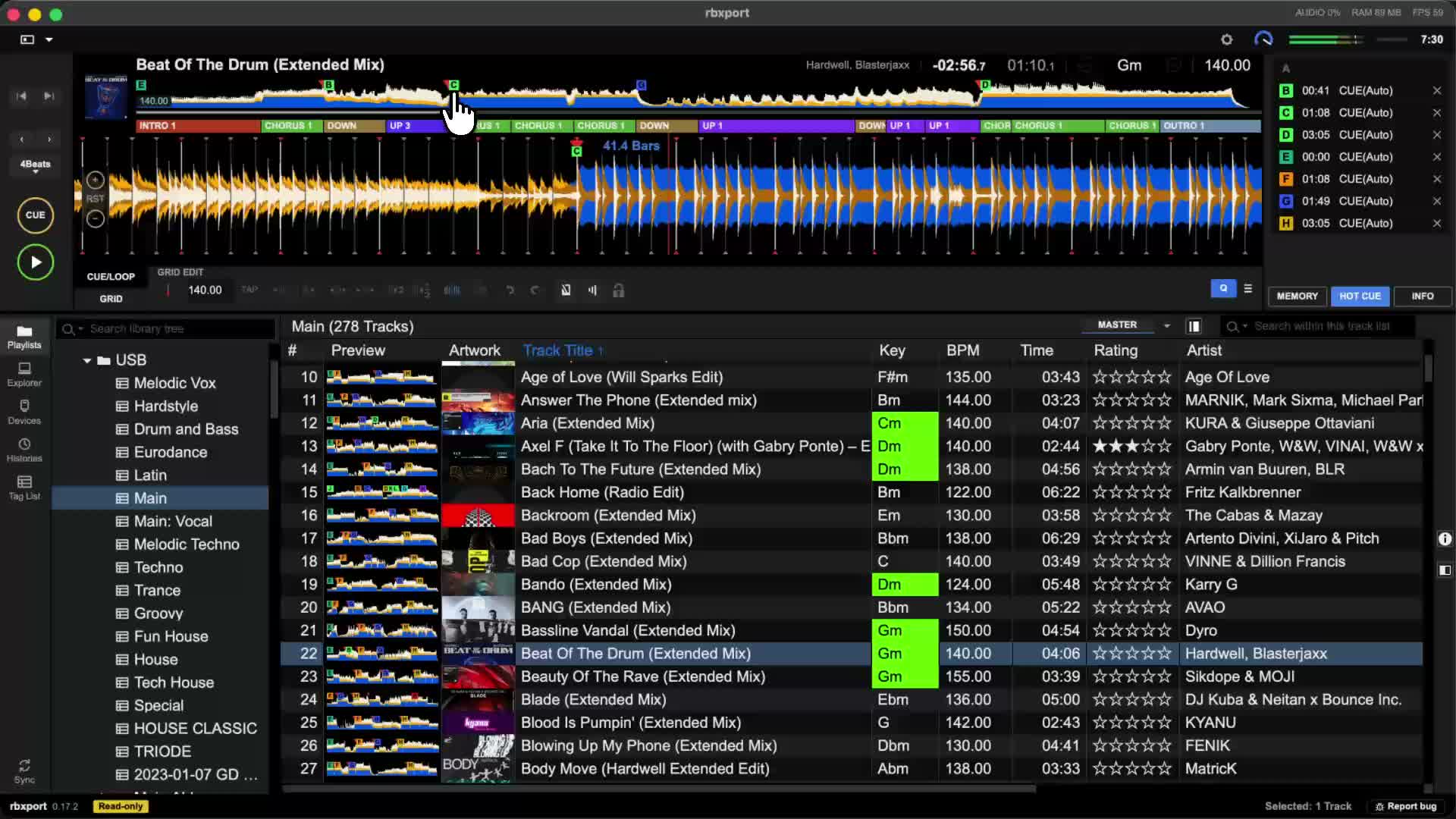
What stays—and what is deliberately left out?
- Library preparation: playlists, folders, metadata, tags, memory cues, hot cues, loops, beatgrids and preview playback.
- Own analysis: BPM, grids, key and waveforms. Its Normal mode suits constant-tempo tracks; RBXport mode follows tempo changes. This is not the same algorithm as rekordbox, so check grids and keys yourself. [7]
- Export: multiple USB drives, player-library databases and LINK EXPORT over Ethernet. [4]
- Not included: controller Performance mode, lighting control, Cloud Library Sync, stems or music editing. Existing rekordbox phrase/vocal analysis can be displayed, but rbxport does not perform those analyses itself. [1]
Own a DDJ-FLX4, DDJ-400 or another laptop controller? rbxport can prepare the collection, but it cannot replace your performance software. Preview playback is not a supported controller DJ setup. USB export to a standalone player is a different workflow from plugging a controller into your laptop. [3]
Mac, Windows and Linux: installation and requirements
- Mac: separate downloads for Apple silicon and Intel; macOS 11 Big Sur or later.
- Windows: 64-bit Windows 10 version 1809 or later; .exe installer or Microsoft Store.
- Linux: x64 AppImage and .deb for Debian/Ubuntu. A Linux download is not a guarantee for every distribution or desktop environment; check dependencies and current issue reports.
These are the requirements published on the download page when we checked. Get installers from the official website, not an unofficial mirror. GitHub currently has no Releases entries; that does not mean there is no downloadable app. The official updater reported 1.10.0, published November 7, 2026. [1] [9]
The repository's browser demo uses a mock library. Opening it does not test a real rekordbox collection, USB export or hardware. There is no need to compile the app yourself just to try the official installer. [2]
It can write to your existing rekordbox library
This is the biggest convenience—and the biggest reason to back up first. rbxport can open the same local master.db and supporting analysis folder that rekordbox uses. Playlist or cue changes are therefore not isolated in a harmless duplicate by default. They can affect what you see the next time you open rekordbox. [3]
The website says you can run the apps alongside each other; the detailed FAQ adds the important qualification: library protection refuses edits while rekordbox or its agent is running. Do not plan simultaneous editing. Close rekordbox fully before making changes, then inspect the library in rekordbox afterwards. Do not assume different Windows/macOS/Linux file paths migrate automatically. [3]
rbxport's backup covers the database and supporting files such as analysis and artwork—not the music files themselves. Keep a separate backup of the audio. Undo, export verification and library protection are useful safeguards, not replacements for a tested backup and restore procedure. [8]
CDJ/XDJ compatibility: three separate questions
The README aims for compatibility with the current rekordbox version and all hardware it supports. That is a project commitment—not a certified matrix of tested models. A working USB requires three things to line up: [2]
- Library format. rbxport writes both legacy DeviceSQL (export.pdb) and OneLibrary (exportLibrary.db). OneLibrary was previously called Device Library Plus. Having both helps cover different player generations, but does not prove every exported feature works everywhere. [5]
- Filesystem and drive layout. The player must be able to read the drive. An older model does not gain exFAT support because rbxport exported it. FAT32 is a broadly useful starting point; check your exact model's manual and firmware rather than applying one rule to every CDJ/XDJ.
- Audio format. The player—not just the computer—must decode the files. FLAC, ALAC, AAC, bit depth and sample rate support vary by model. A correct library database cannot fix an unsupported audio codec.
Read our USB formatting guide before preparing a test drive.
Official library requirements: representative models
- Device Library: CDJ-3000, CDJ-2000NXS2, CDJ-350, XDJ-XZ, XDJ-RX3, XDJ-1000MK2.
- OneLibrary: CDJ-3000X, OPUS-QUAD, OMNIS-DUO, XDJ-AZ.
These groupings come from the manufacturer's USB export matrix, not from a list of players we tested with rbxport. Note the distinction between CDJ-3000 and CDJ-3000X. The March 2026 AlphaTheta notice confirms the two library families; current rekordbox creates both, but that is not proof of a third-party export's behavior. [10] [11]
What has actually been tested?
- CDJ-3000 / XDJ-RX3: the official website reports physical LINK EXPORT testing on these models. This establishes reported experience, not certification for every firmware and feature. [1]
- XDJ-RX3, firmware 1.20: the technical test log describes a physical Linux LINK browse/load/play check. That is LINK evidence, not an all-purpose USB guarantee. [6]
- XDJ-AZ, firmware 1.30: the repository records a passing emulated FAT32 USB test. It explicitly says emulation does not establish behavior on a physical XDJ-AZ. [6]
- Other models and firmware: do not infer verified compatibility from the presence of export code or a PRO DJ LINK logo. Check current documentation and test your actual equipment.
LINK EXPORT here means serving the library to players over Ethernet. It is not Ableton Link, cloud sync or a controller audio driver. The project itself acknowledges that testing every player and firmware requires hardware it does not have. [1]
Audio conversion: useful, but not magic
The app handles familiar DJ formats such as MP3, WAV, AIFF, FLAC and AAC/ALAC in MP4 containers. Do not read that as a promise for every codec profile or every player. In particular, an extension accepted on import does not prove successful analysis, playback or USB support.
For example, Pioneer lists FLAC/Apple Lossless alongside WAV/AIFF at up to 96 kHz and 24-bit for the CDJ-3000. That model's specification must not be applied to older players. Nor is exFAT a synonym for OneLibrary: the library database and filesystem are separate requirements. [12]
The optional Maximum CDJ compatibility setting is off by default. According to the export guide, it can convert incompatible mono/stereo sources to 16-bit, 44.1 kHz stereo WAV/AIFF or 320 kbps CBR MP3 on the USB. Already compatible MP3 and integer-PCM WAV/AIFF at 44.1/48 kHz are kept. Surround input is refused instead of silently downmixed. [4]
WAV can use substantially more USB space than a compressed source. Downsampling can remove high-resolution information; MP3 conversion is lossy. Conversion improves audio compatibility, but cannot fix a wrong filesystem, a faulty USB stick or an incompatible library format.
Export, Sync and Import are not the same thing
Ordinary track/playlist/folder export adds material while retaining unrelated existing playlists. Sync Manager instead makes the managed device selection match the playlists you tick: unticked playlists can be removed from the device. Read the confirmation rather than treating Sync as a harmless copy button. [4]
Import player changes before syncing again. Sync is outbound; Import is a separate operation for retrieving supported cue/grid edits, history and ratings. If you adjusted cues at a gig, do not assume a fresh outward sync automatically merges them. The desktop library generally wins, and some detected conflicts block sync to prevent loss. [4]
Our recommendation: test it without betting the gig on it
The public repository was created in September 2026, and it is changing quickly. Version 1.10.0 is not itself evidence of years of stability. There is serious test infrastructure and detailed safety documentation, but also ongoing fixes and hardware coverage gaps. We would treat rbxport as a promising preparation alternative—not blindly trust it with the only copy of a professional library.
- Back up the complete library and audio files separately; confirm how to restore them.
- Close rekordbox and its agent before library edits. Start with a small test playlist.
- Use a spare USB drive—not the only stick for tonight's gig. Keep a known-good rekordbox export.
- Include your real formats, long tracks, non-ASCII filenames, hot cues, memory loops and any tempo-changing music.
- On the exact player and firmware: browse, search, load, play, check waveforms, grids, cues and loops. Test LINK separately if you use it.
- Import any player-side edits, perform a second sync, and check the library again in both apps. Only then consider a gradual switch.
For the USB-only DJ, fewer features can be a genuine benefit. For the controller DJ or anyone relying on cloud features and stems, keeping rekordbox is the practical answer. And whichever app you choose: selection, preparation and listening matter more than the startup screen.
From library prep to the DJ booth
Learn the fundamentals on real club equipment at DJ Intro Weekend Workshop, or meet us at Open House before choosing a course.
Frequently asked questions
Is rbxport a debloated version of rekordbox?
Not literally. It is an independent, free, open-source app for library preparation, USB export and PRO DJ LINK, inspired by rekordbox. It is not an official or modified rekordbox release.
Can I use rbxport with a DDJ-FLX4?
You can prepare your library, but rbxport has no controller mapping or Performance mode. You still need suitable DJ performance software to play from your laptop with an FLX4.
Does rbxport work with every CDJ and XDJ?
That is the project's goal, not a documented guarantee. USB exports include DeviceSQL and OneLibrary, but the player, firmware, filesystem and audio format must still be compatible. Test a separate USB drive on your exact player.
Does rbxport modify my rekordbox library?
Yes, it can work directly with the same local library. Library protection prevents changes while rekordbox or its agent is running. Back up both library data and your music files before testing.
Is rbxport free, and does it need a rekordbox subscription?
rbxport is free, open-source software (GPL-2.0-or-later) and does not require a rekordbox subscription. Check the official download page for the current version before installing.
How do I export to USB for CDJs without opening rekordbox?
rbxport can write rekordbox-style USB exports for standalone players. Use a separate, correctly formatted USB drive (FAT32 is the broadest choice), export a small test playlist and check it on your exact player before a gig.
Sources and further reading
Checked November 10, 2026. Repository links are pinned to the inspected source snapshot; the website, downloads and issues can change afterwards. rbxport is independent of Rumkraft and AlphaTheta.
- rbxport: produkt, downloads / product, downloads
- README: scope, GPL, disclaimer
- FAQ: shared library, library protection, controllers
- USB export: sync, import, audio conversion
- USB databases: DeviceSQL, OneLibrary, validation limits
- PRO DJ LINK: physical tests vs firmware emulation
- Analysis: BPM, grids, keys, limitations
- Backups
- Current download metadata / version
- AlphaTheta / rekordbox: official USB library support matrix
- AlphaTheta: OneLibrary / Device Library notice (March 2026)
- Pioneer DJ: official CDJ-3000 audio specifications
Stay updated
Get more articles like this
Subscribe to our newsletter and receive new guides, tips, and tutorials directly in your inbox.
No spam. Unsubscribe at any time.